Perf Advisor TECH PREVIEW
Use Anomalies to monitor your cluster for performance anomalies - whether with the database or applications.
The Anomalies view continuously samples cluster activity every second using the Active Session History, and correlates it with query-level data from pg_stat_statements to automatically identify anomalies, including:
- hot tablets starving other shards
- hot nodes with disproportionate CPU, query load, or I/O
- lock contention issues cascading through your application
- a query whose latency has quietly doubled
For each detected anomaly, you can drill down to view a root cause analysis page with actionable next steps, explore detailed supporting data, and understand the underlying cause.
To view the raw metrics used for anomaly detection, navigate to Performance>Cluster Load.
Anomalies is only available for clusters running YugabyteDB v2024.2.7 and later.
Tech Preview
Anomalies is currently in Tech Preview. To try the feature, contact Yugabyte Support.To view anomalies, click the cluster Perf Advisor tab.
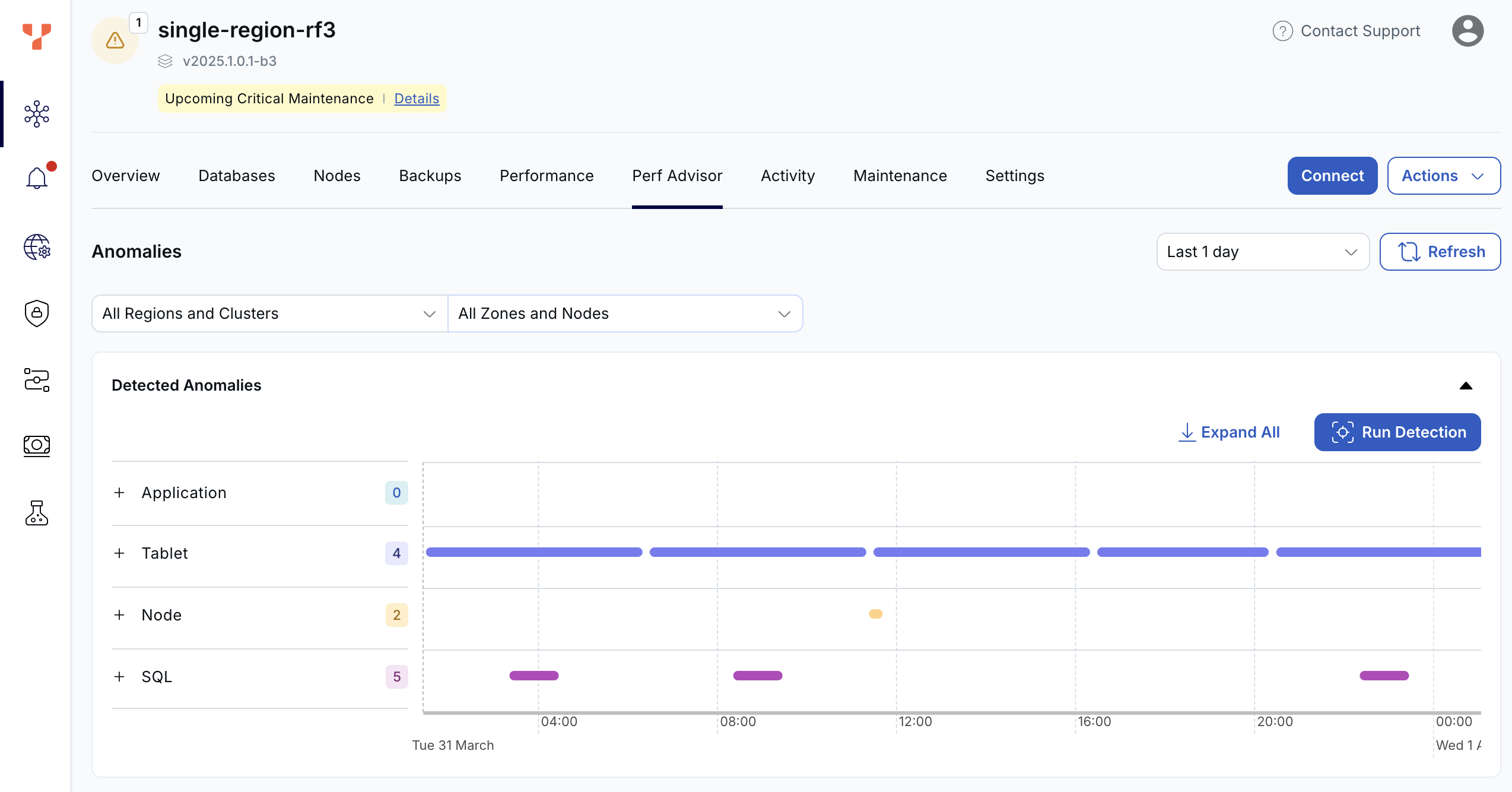
The dashboard shows automatically detected anomalies and their durations.
Detected anomalies
Detected anomalies shows potential performance impacting anomalies through time, by type. Use this view to answer the question When did problems occur, and what changed at that time.
Anomalies are divided into the following categories:
| Type | Description |
|---|---|
| Application | Anomalies that can only be addressed at the application level. For example, if the application is sending all its connections directly to one node in the cluster, this will lead to a load imbalance on that node. This can be addressed by using a load balancer or YSQL Connection Manager. |
| Tablet | Issues internal to the database. This could include unused or redundant indexes, incorrect table partitioning (hash vs range), large tablets that need splitting, or hot tablets. |
| Node | Node-specific issues, such as one node with higher CPU or IO load (hot spot), or slow disk. |
| SQL | Issues specific to particular SQL statements, such as when the latency of a statement gets significantly higher, high waits for locks, or excessive catalog reads. |
Each anomaly category shows the number of anomalies in that bucket, along with a chart of the duration of anomalies.
Click the + to drill down to view individual anomalies, organized by sub-category. Click Expand All to expand all categories to show all the anomalies under each type.
Click an anomaly to display the Root Cause Analysis page for that anomaly.
Application anomalies
- Connections Uneven
- SQL connections are spread unevenly across the nodes. If connections are not balanced across nodes, a load balancer may be required to prevent node hotspots.
Tablet anomalies
Anomaly |
Description |
|---|---|
| Large Tablet | One or more tablets in a table are significantly larger than the average of other tablets, possibly causing uneven compactions or query times. In this case the tablet should probably be split. |
| Redundant Index | A redundant index was found. These can add write overhead and bloat memory use. |
| Uneven Tablet IO | Significantly more read/write requests to the table are being sent to only a few tablets, compared to the average. May indicate shard-level skew or a hot shard. |
| Unused Index | An unused index was found. These can add write overhead and bloat memory use. |
| Use Range Index | A HASH index was found where RANGE index would be more suitable. Schema mismatch can cause poor performance for range queries. |
Node anomalies
Anomaly |
Description |
|---|---|
| Slow IO | Triggered when IO wait time is greater than 90%, or IO queue depth is more than 10. Determine if IO latency increased (IO bottleneck) or if demand increased (runaway queries). Next steps:
|
| Uneven Data | Table data is spread unevenly across the nodes. |
| Uneven CPU | CPU use is unbalanced across the nodes. Triggered when a node's CPU is >80% and >50% above the cluster average. Solutions:
|
| Uneven IO | The read and write distribution is unbalanced across the nodes. Triggered when a node has >10% skew in read/write ops or query activity. Often caused by hash distribution issues or application connection imbalance. |
| Uneven SQL | SQL queries are spread unevenly across the nodes. |
SQL anomalies
Anomaly |
Description |
|---|---|
| SQL Latency | Triggered when latency doubles for a query that previously ran >20ms and >0.2 execs/sec. Possible causes include:
Investigation steps:
|
| Catalog Reads | Triggered when more than 50% of wait time is due to Catalog Read waits. Causes:
Solutions:
|
| Locks | Triggered when significant time is spent waiting for locks. Solutions:
|
Root cause analysis
Clicking an anomaly in the Detected Anomalies dashboard opens a detailed Root Cause Analysis (RCA) for the anomaly.
Each RCA displays an Anomaly Possible Cause, with a summary, description, and analysis of the possible cause for the anomaly.
Depending on the anomaly type, the RCA will display relevant charts.
The following sections provide examples of typical anomaly RCAs.
Hot Tablet
The Hot Tablet anomaly identifies tablets in a table that are receiving significantly more activity than others. In a distributed database, performance is highest when load is evenly distributed. When a single tablet receives most of the traffic, it becomes a bottleneck and limits overall throughput.
This usually indicates an opportunity to improve either:
- how queries access the data, or
- the partitioning strategy of the table or index
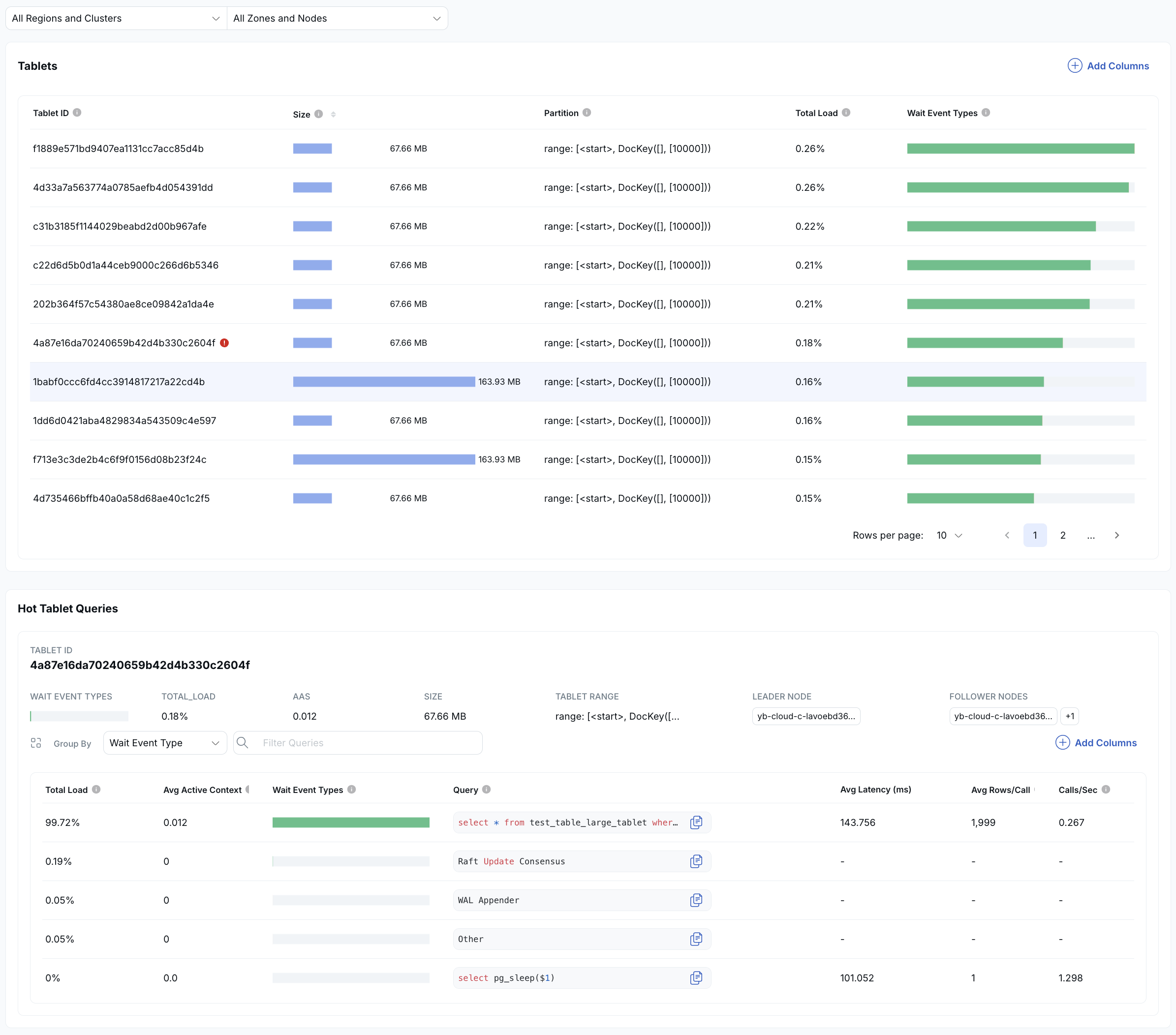
The top section lists all tablets for the object and ranks them by activity. Each tablet is shown with a colored bar representing its relative load. In this example, the first tablet handles nearly all the activity, while the others have little to none, clearly indicating imbalance.
The bottom section shows the queries accessing the hot tablet, ranked by how much load they generate. Click a query to drill down into detailed SQL diagnostics.
Hot Node
The Hot Node RCA highlights when one or more nodes are handling a disproportionate amount of activity compared to the rest of the cluster. In a distributed database, performance is best when load is evenly distributed across all nodes.
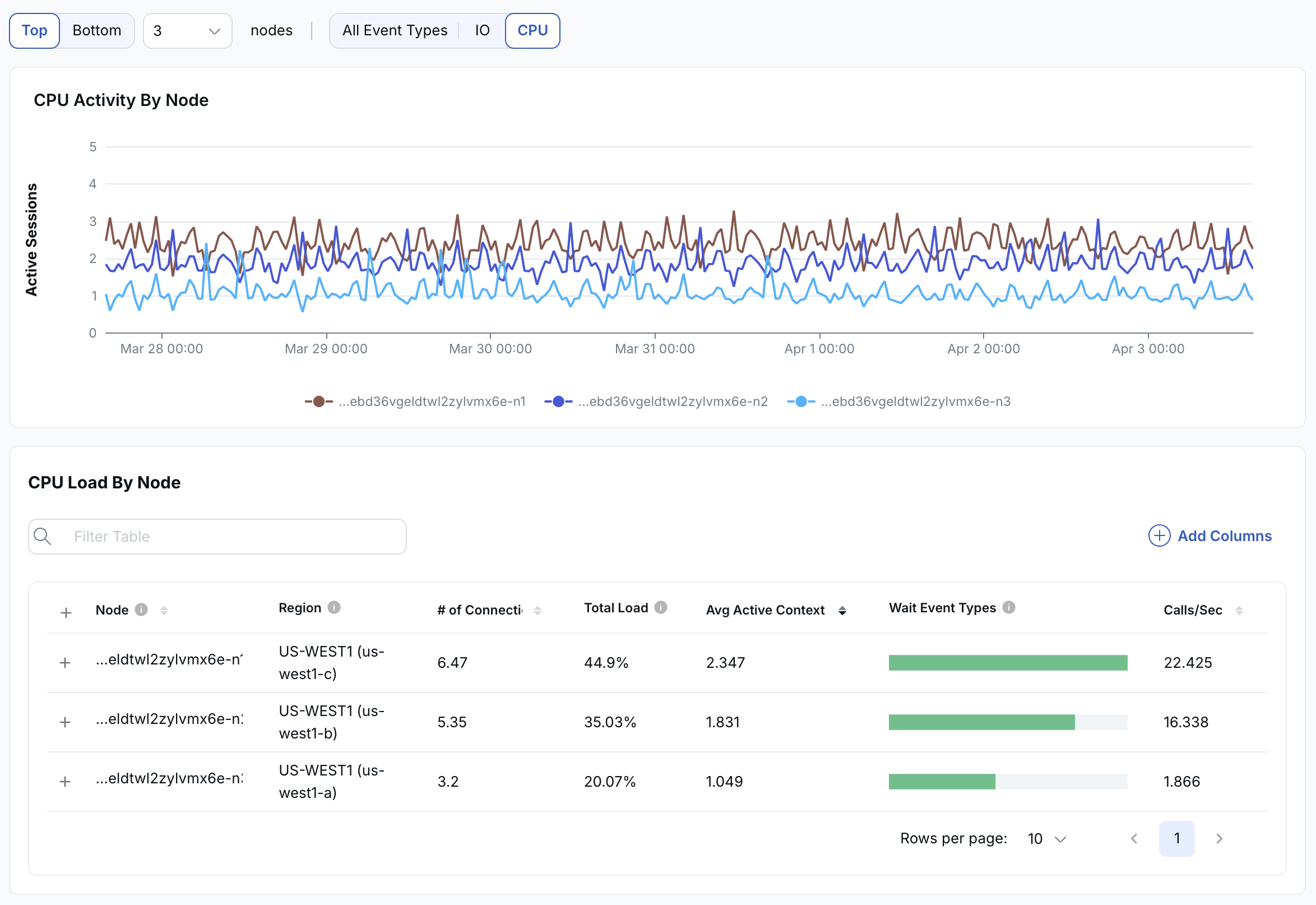
The top graph shows activity across nodes over time. In this example, the light blue line indicates a node with significantly higher CPU load than the others, signaling an imbalance.
Below the graph is a list of nodes, with each node's relative CPU load shown as a green bar so that you can identify which nodes are overloaded at a glance.
You can expand each node by clicking the plus icon to see the SQL statements running on that node, ranked by CPU usage. From there, you can click into any SQL statement to drill down into detailed query-level diagnostics.
SQL Latency
An SQL latency anomaly is triggered when:
- A query spends more than 50% of its execution time waiting on catalog reads.
- A query spends more than 50% of its execution time waiting on locks.
- A query's latency increases by 2x or more compared to its baseline.
Any of these can indicate candidates for query tuning.
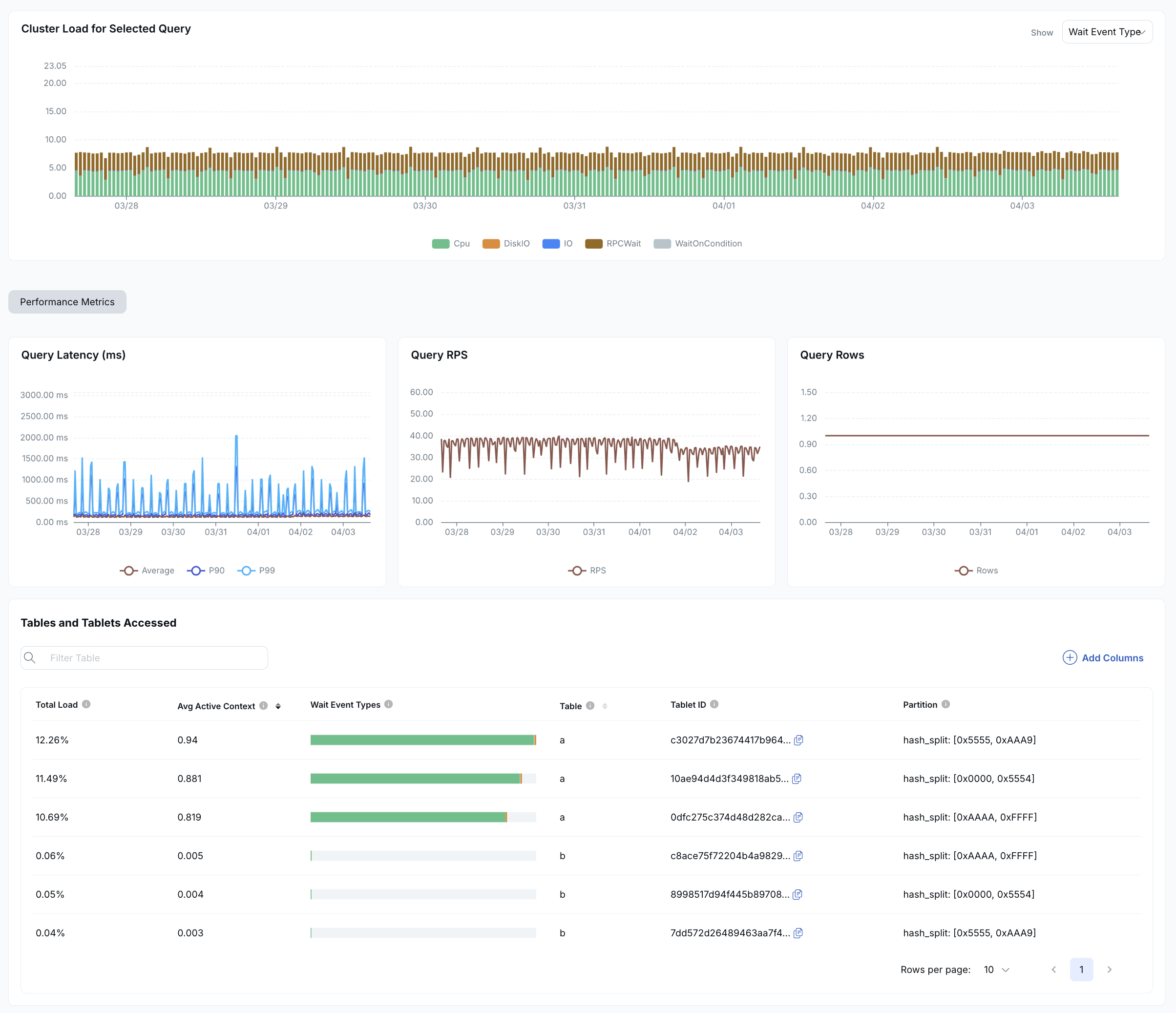
SQL latency RCAs show:
- The cluster load for the problem query.
- Metrics related to the query: query latency, RPS, and rows.
- A table listing the tables and tablets accessed by the query.